
Introduction to Website Performance
Website performance refers to how quickly and efficiently a website loads and operates for its users. In the digital age, the speed of a website is crucial not only for user experience but also for search engine optimization (SEO). A website that operates efficiently creates a seamless experience for visitors, encouraging them to remain longer and engage more deeply with the content, ultimately leading to higher conversion rates.
The performance of a website is influenced by several key metrics, including page load time, responsiveness, and resource utilization. Page load time is often the first and most critical factor that users consider; research indicates that even a one-second delay in loading time can lead to a significant reduction in user satisfaction and can influence the likelihood of returning to the site. Therefore, optimizing load times is essential for maintaining user interest.
Another critical aspect of website performance is the responsive design, which ensures that a website operates effectively across various devices and screen sizes. In today’s mobile-first world, having a responsive design is not just an option but a necessity. Search engines also prioritize responsive sites in their rankings, which means that a site that fails to provide a good user experience on mobile devices could face detrimental impacts on its visibility.
Moreover, efficient resource utilization, including the optimization of images, scripts, and overall architecture of the website, will further enhance performance and lead to higher search engine rankings. A well-optimized website not only provides a better experience for users but also appeals to search engines, making it more likely to be discovered and recommended.
This blog will explore various effective techniques and tools that website owners can employ in order to enhance their website performance, ultimately improving user experience and achieving better SEO outcomes.
Understanding Key Performance Indicators (KPIs)
Key Performance Indicators (KPIs) are critical metrics that provide insights into the performance and efficiency of a website. To enhance user experience and ensure effective website functionality, it is essential to monitor and analyze these indicators systematically. Among the primary KPIs that measure website performance, load time, time to first byte (TTFB), and overall responsiveness stand out as vital metrics.
Load time refers to the duration it takes for a web page to fully render in a user’s browser. It is often the first impression that users have of a website; thus, a slower load time can negatively impact user satisfaction and lead to higher bounce rates. To measure load time, various tools are available, such as Google PageSpeed Insights and GTmetrix, which provide comprehensive analyses of loading performance and offer recommendations for improvements.
Time to First Byte (TTFB) is another crucial KPI that gauges the responsiveness of a website’s server. It measures the time taken from the moment a user requests a page until the first byte of data is received by the browser. A low TTFB suggests an efficient server and quick delivery of content, whereas higher values may indicate server delays or issues with hosting configurations. Techniques such as optimizing server performance, employing Content Delivery Networks (CDNs), and utilizing proper caching strategies can significantly enhance TTFB.
Overall responsiveness of a website refers to how quickly a site reacts to user inputs, including clicks and navigation commands. A responsive website ensures that user interactions result in immediate feedback and fast content adjustments, significantly enhancing user engagement. Best practices for improving responsiveness include optimizing JavaScript and CSS files and reducing server response times.
Understanding and measuring these KPIs is integral to assessing website performance, guiding improvements, and ultimately fostering a more satisfying user experience.
Optimizing Images for Faster Loading
Images play a vital role in website aesthetics and user engagement; however, large image files can severely impact website loading times. To enhance website performance, web developers and designers should prioritize the optimization of images. Several techniques can aid in achieving faster load times, ultimately improving user experience.
First and foremost, selecting the appropriate image format is crucial. JPEG is ideal for photographs due to its efficient compression, while PNG supports transparency and is better for graphics and logos. Newer formats like WebP and AVIF offer superior compression rates, reducing file sizes without sacrificing quality. It’s advisable to test various formats to determine the best fit for different types of images on your website.
Secondly, utilizing compression tools can significantly decrease file sizes. Tools such as TinyPNG and ImageOptim allow users to compress images while maintaining clarity. It is recommended to compress images before uploading them to the website, ensuring that page sizes remain as small as possible.
Another important aspect is to implement responsive design principles. Images should adapt to various screen sizes, which can be achieved through CSS and HTML attributes such as ‘srcset’ and ‘sizes’. This approach ensures that users receive appropriately scaled images, enhancing load times on devices with smaller displays.
Furthermore, integrating lazy loading techniques can further optimize image loading. By loading images only when they enter the viewport, this method minimizes initial loading time and conserves bandwidth. Popular JavaScript libraries, such as Lozad.js and Intersection Observer API, make the implementation of lazy loading seamless.
By focusing on image optimization through the use of suitable formats, effective compression, responsive designs, and lazy loading practices, website owners can greatly enhance page speed and improve overall website performance.
Minifying CSS, JavaScript, and HTML
Minification is the process of removing unnecessary characters from source code without changing its functionality. This technique is particularly relevant for CSS, JavaScript, and HTML files. By eliminating whitespace, comments, and other non-essential elements, the overall size of these files can be significantly reduced. This reduction in file size directly contributes to improving website performance by decreasing loading times and enhancing the user experience.
The benefits of minifying resources are manifold. Firstly, smaller file sizes result in less data transfer between the server and the user’s browser, which can lead to quicker load times. This is especially important in an age where users expect websites to load within a few seconds. Additionally, search engines tend to favor websites that load efficiently, potentially improving overall search rankings. When resources are minified, they can also help decrease the chances of errors since the code is cleaner and more efficient.
There are several tools and plugins available that can assist web developers and designers in the minification process. Popular options include tools like UglifyJS for JavaScript, CSSNano for CSS, and HTMLMinifier for HTML. These tools can automate the minification process, allowing developers to focus on other critical aspects of their projects. Moreover, many content management systems (CMS) offer dedicated plugins that integrate easily, enabling users to minify resources with minimal effort. For instance, plugins like Autoptimize and WP Rocket can streamline this process for WordPress users.
In practice, implementing minification can greatly enhance performance metrics. For example, by minifying a site’s CSS files, one can achieve a noticeable improvement in load times, which is often reflected in better user engagement and retention. Consequently, optimizing website performance through minification not only supports technical efficiency but also contributes positively to user satisfaction and conversion rates.
Utilizing Content Delivery Networks (CDNs)
In the digital landscape, ensuring efficient website performance is crucial for a positive user experience. One effective strategy to achieve this is by utilizing Content Delivery Networks (CDNs). CDNs are a network of strategically distributed servers that store cached versions of your website’s content. By serving users from the nearest geographical location, CDNs can significantly enhance load times and improve overall accessibility.
The primary advantage of employing a CDN lies in its ability to reduce latency, which is the delay before a transfer of data begins following an instruction for its transfer. When users access your website, data needs to traverse longer distances, resulting in increased loading times. By placing content closer to the end-user, CDNs mitigate these delays and ensure that visitors can load pages quickly, regardless of their geographic location.
This swift delivery of content not only elevates user satisfaction but also contributes positively to search engine optimization (SEO). Search engines prioritize fast-loading websites, thus improving your site’s ranking in search results. Moreover, CDNs offer enhanced security features, such as DDoS protection and secure sockets layer (SSL) encryption, which safeguards sensitive user data while also maximizing uptime.
When selecting a suitable CDN for your website, consider factors such as traffic volume, budget, and the geographical distribution of your audience. Some CDNs specialize in streaming or dynamic content, while others are tailored for static resources. Evaluate different providers based on their uptime guarantees, performance metrics, supported features, and customer support options to identify the right fit for your specific needs.
By integrating a Content Delivery Network into your website strategy, you can improve performance dramatically, meet the expectations of your audience, and secure your online assets effectively.
Implementing Browser Caching Strategies
Browser caching is an essential mechanism that allows web browsers to store selected elements of a website locally on a user’s device. This process significantly reduces loading times for repeat visits, thereby enhancing overall website performance. The fundamental principle behind browser caching is that it enables browsers to retrieve stored cached data, minimizing the need for repeated requests to the server. This not only speeds up the user experience but also reduces server load and bandwidth consumption.
To effectively implement browser caching strategies, the first step is to identify which resources should be cached. Static assets like images, stylesheets, and JavaScript files are prime candidates for caching. These files often do not change frequently, making them suitable for long-term storage in the user’s browser. Configuring the appropriate cache headers for these resources is critical, and this can be achieved through server-side settings.
There are several caching techniques that can be utilized, including Cache-Control, Expires, and ETag headers. The Cache-Control directive allows web developers to specify how long (in seconds) the cached content should be stored before checking back with the server for updates. Meanwhile, the Expires header can set an expiration date for cached resources. The ETag header serves as a validation token that helps the browser determine if the cached version of a resource is still valid or needs to be updated.
To implement these cache configurations, modifications can be made in the server files—such as the .htaccess file for Apache servers or the web.config file for IIS servers. Applying these strategies not only improves website speed but also contributes significantly to better user engagement and SEO ranking. It is advisable for website owners to regularly review their caching strategies and adjust settings to reflect any updates in their site’s content or design.
Reducing Server Response Time
Server response time is a critical factor in determining the performance of a website. It refers to the duration taken by a server to process a request from a user and send back the requested resources. Numerous elements influence this time, with hosting plans and server location being among the most significant. By examining these components, website administrators can implement strategies to enhance server performance effectively.
Firstly, the choice of hosting plan can have a profound effect on server response time. Shared hosting, while cost-effective, often suffers from slower response rates due to the fact that multiple websites share the same server resources. In contrast, dedicated or virtual private servers (VPS) provide a more stable environment as they allocate a specific portion of resources solely for one website. This reduced competition invariably leads to quicker response times, especially during peak traffic periods.
Another significant factor is the geographical location of the server. When a server is situated far away from the user’s location, the time taken for data to travel can negatively impact response times. Utilizing a Content Delivery Network (CDN) can mitigate this issue. A CDN stores cached copies of a website’s content in multiple locations around the globe, allowing users to receive data from a geographically closer server, thus improving the speed of content delivery.
Optimizing server configurations plays a crucial role as well. Regular updates to server software and enabling compression can significantly reduce the payload of data being transmitted. Additionally, minimizing the use of redirects and streamlining database queries are beneficial practices for reducing server lag. By focusing on these aspects, website owners can significantly enhance server response time, leading to improved user experience and overall website performance.
Regular Monitoring and Testing of Performance
Regular monitoring and testing of website performance is crucial for maintaining an optimal user experience and ensuring that your website meets the expectations of its audience. Websites are dynamic entities that change frequently due to new content, design updates, or changes in server configurations. This variability necessitates ongoing assessments to identify any potential performance issues that may arise.
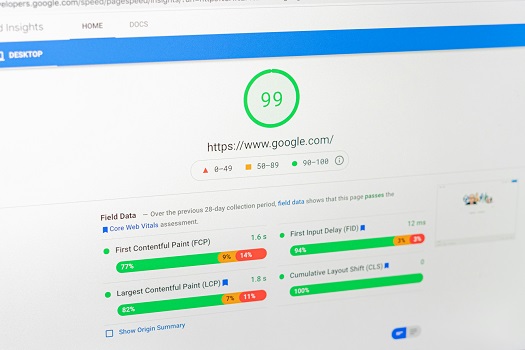
Utilizing various performance monitoring tools can significantly aid in analyzing the speed, responsiveness, and overall functionality of a website. Tools such as Google PageSpeed Insights, GTmetrix, and Pingdom provide valuable insights into different aspects of performance. For instance, Google PageSpeed Insights analyzes both mobile and desktop versions of your site, offering suggestions for enhancement based on web vitals metrics. Similarly, GTmetrix combines Google’s Lighthouse and WebPageTest metrics to deliver a comprehensive performance score and a waterfall chart that breaks down each element of the page.
After running these tests, understanding the results is vital for effective performance improvement strategies. Key metrics to focus on include load time, first contentful paint (FCP), and time to interactive (TTI). Load time reflects how quickly your website becomes usable, FCP indicates the speed at which users can see the initial content, while TTI measures when the site is fully interactive. Once these metrics are understood, website administrators can take specific actions such as optimizing images, leveraging browser caching, or minimizing JavaScript and CSS files.
Ultimately, consistent performance monitoring not only enhances user satisfaction but also improves search engine ranking. By regularly testing and analyzing website performance, you can proactively address issues and continually refine your site for improved efficiency and effectiveness.
Conclusion and Future Trends in Website Performance
In evaluating the various strategies for improving website performance, it is evident that a comprehensive approach is essential. Key techniques discussed include optimizing images, leveraging browser caching, minimizing HTTP requests, and utilizing content delivery networks (CDNs). Each of these strategies contributes significantly to enhancing loading times and overall user experience, which are pivotal for retaining visitors and improving conversion rates.
Looking towards the future, emerging trends suggest a significant shift towards AI-driven optimization techniques. These advanced technologies have the potential to analyze user behavior patterns and dynamically adjust website performance in real-time. With continuous developments in AI, such as machine learning algorithms becoming more adept at predicting user needs, websites may soon be able to deliver personalized experiences while also optimizing performance seamlessly.
Moreover, as web technologies evolve, user expectations are also rising. Users increasingly demand faster, more interactive, and mobile-responsive websites. This trend underscores the importance of integrating performance best practices into the design and development phases of website creation. Building responsive designs using frameworks that prioritize speed, along with implementing rigorous performance testing, will become vital in meeting these evolving standards.
In conclusion, as businesses strive to enhance their online presence, keeping abreast of both established and emerging performance optimization strategies will be critical. By embracing AI and preparing for shifts in user expectations, website performance can not only be improved but can also adapt to future challenges, ensuring that organizations continue to meet and exceed the needs of their users.